Best LLM Cost Tracking Tools in 2026: Gateways, Observability, and Cost Management
The best LLM cost tracking tool depends on your question: gateways control spend, observability tools surface it, and cost management platforms attribute and optimize it.
Most teams that ship AI eventually wonder what they are actually spending, and on what. It sounds like it should have an easy answer. If you already pay for an observability tool, a gateway, or both, it is reasonable to expect one of them to just tell you.
Sometimes one of them does, and that is the end of it. Sometimes it does not, because the tool you reached for was built for something else and shows cost as a side effect rather than as its main job. "Best LLM cost tracking tool" has no single answer: the right choice depends on the question you are actually trying to answer, and for plenty of teams the tools they already run are enough.
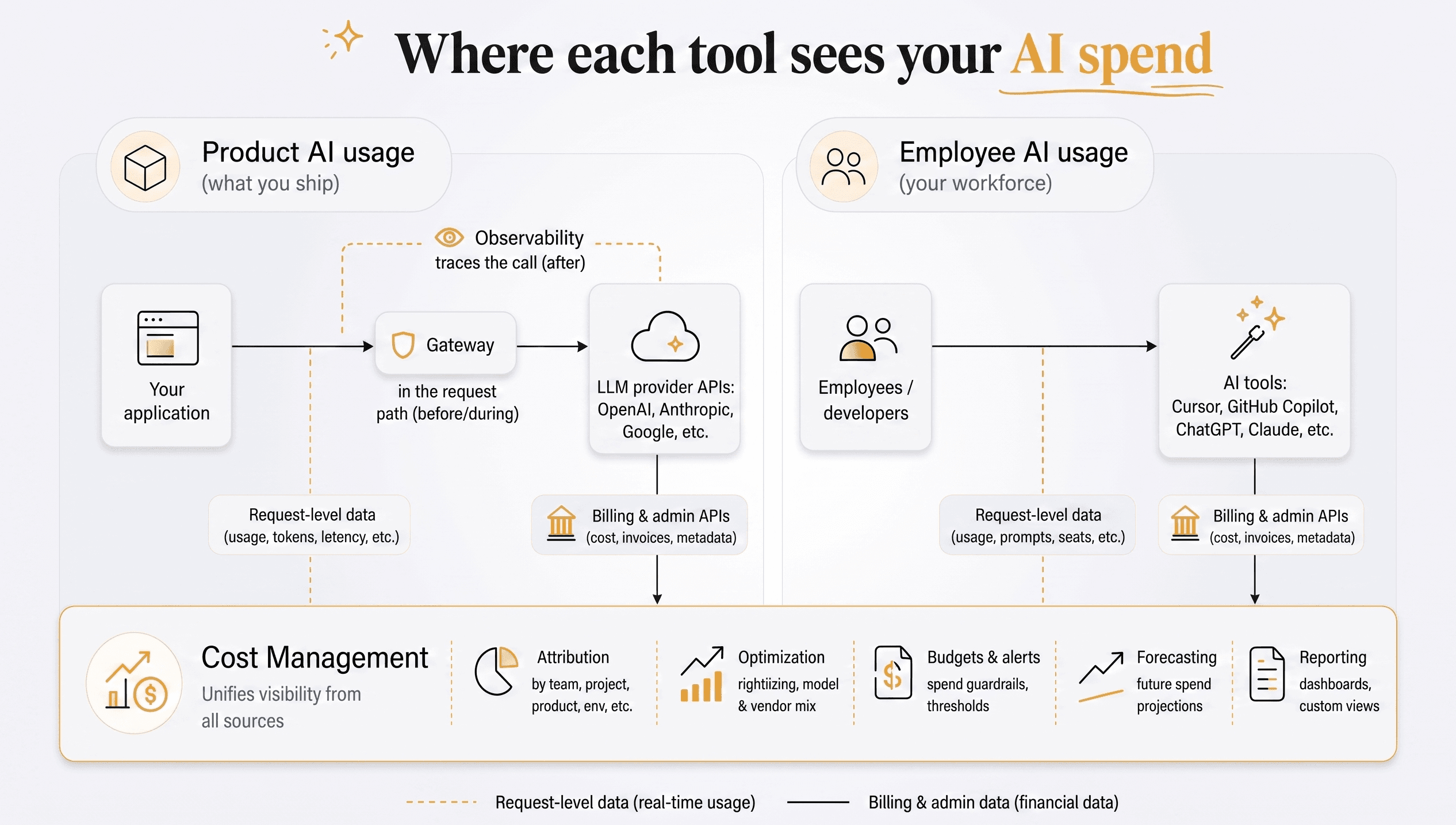
It also helps to remember that "AI spend" is two things, not one: the API calls your product makes, and the AI tools your team uses internally, like Cursor, Copilot, and ChatGPT. Gateways and observability only see the API side, because they sit in your request path and can only measure what flows through them. Cost management reads spend from billing and usage data instead, so it can cover both sides and give you visibility into your total AI spend.
Three kinds of tools touch LLM cost, each with a different primary job:
| Category | Primary purpose | Who uses it | How it touches cost |
|---|---|---|---|
| Gateways | Route and govern LLM traffic across providers | Engineers | Control spend in the request path by enforcing budgets and caps |
| Observability & eval | Trace and measure agent and output quality | Engineers and product managers | Log cost as one metric among many |
| Cost management | Explain, plan, and report total AI spend (AI FinOps) | Engineering, finance, and leadership | Attribution, optimization, budgets and alerts, forecasting, and reporting |
Once you know which job you care about, the shortlist gets a lot shorter. Reach for the wrong category and you end up asking a quality tool a finance question, then wondering why the numbers never line up with the invoice.
Gateways treat cost as a lever to enforce. Observability tools treat cost as one metric sitting next to quality. Cost management tools start from the spend itself and work outward, answering who it belongs to, whether it is efficient, what it will be next month, and how to report it to finance. None of these is inherently better, they are just built to answer different questions.
Quick answer: there is no single "best" LLM cost tracking tool, only the best one for the question you are asking.
- Stop a runaway call before it spends: reach for a gateway (LiteLLM to self-host for free, or Portkey from $49/mo).
- Debug why an agent is slow, wrong, or expensive: reach for observability (Langfuse at $0 or $29/mo, LangSmith from $39/seat/mo, or Datadog if you already run it).
- Know what you spend, on what, and whether it matches the invoice: reach for a cost management tool (SuperPenguin for per-feature attribution and cost per pull request, CloudZero for unit cost, or Vantage if you already track cloud spend).
The rest of this guide explains why, with current pricing for each tool.
Most tools show you a number. Far fewer were built to answer the question behind it.
Category 1: LLM gateways for cost control
A gateway sits between your application and the providers, exposing one API while it routes, retries, caches, and enforces budgets. Because every call flows through it, it sees cost in real time and can block a request that would blow a budget. The trade-off is the gateway's place in your request path: a hosted gateway means routing live traffic through a third party, though a self-hosted one like LiteLLM keeps everything inside infrastructure you control, with only the model call itself leaving your network.
How gateways relate to cost
A gateway's relationship to cost is real but bounded, and all of it comes from sitting in the request path. Because every call passes through it, a gateway can act on spend at the moment it happens:
- Enforce budgets and caps. Reject or throttle a request once a key, team, or project crosses a spend limit. This is the one thing only an in-path tool can do: stop a call before the money is spent.
- Cut cost with caching. Return a stored response for a repeated call instead of paying for it again.
- Apply routing rules you set. Fall back to a cheaper or more available model by configuration. This is rule-based, not predictive: mainstream gateways do not yet read a prompt, estimate what the task will cost, and pick the cheapest model that can handle it.
For visibility, a gateway meters the calls that flow through it and reports usage and cost by key, team, app, or model. That is genuinely useful, but it is scoped to the gateway: it does not see provider invoices, spend that bypasses the gateway, or employee tool usage, and it generally stops at estimates rather than reconciling against the real bill. Cost here is a control lever and a reporting view, not the product.
The gateways worth knowing
| Tool | License | Self-host | Price | Notable for |
|---|---|---|---|---|
| Portkey | Apache 2.0 | Yes | Free; Production $49/mo; Enterprise custom | Mature policy, guardrails, dashboards |
| OpenRouter | Hosted | No | No platform fee; 5.5% on credit top-ups; 0% inference markup | 300+ models behind one API |
| LiteLLM | MIT | Yes | Free to self-host; Enterprise from ~$250/mo | Open-source substrate, per-key budgets |
| Vercel AI Gateway | Hosted | No | Free ($5/mo credits); list price, 0% markup | Built into the Vercel platform |
Portkey
Portkey sits in front of multiple providers behind a single API, handling routing, retries, caching, guardrails, and per-team policy. It exposes dashboards for requests, latency, and cost by app, team, and model, so it does surface spend, just as a reporting view on top of the gateway rather than as a dedicated attribution product. In practice that means it buckets cost by gateway tags (app, team, model) rather than arbitrary per-request, per-feature attribution. One thing to flag for a published comparison: Palo Alto Networks completed its acquisition of Portkey in May 2026 and is folding the gateway into its Prisma AIRS security platform. The Apache 2.0 core is protected by its license, but the managed product's packaging and pricing may shift.
OpenRouter
OpenRouter exposes hundreds of models from many providers through one endpoint and a unified API. It passes provider pricing through with no per-token markup, so you pay the same rate you would directly with the provider; the fee sits on prepaid credit purchases instead (5.5%, with a $0.80 minimum). Bring-your-own-key is also supported, with the first 1 million BYOK requests each month free and 5% of the equivalent cost after that. The unified access makes it popular for prototyping and reaching a wide range of models without separate provider accounts.
LiteLLM
LiteLLM is an open-source (MIT) gateway and SDK that fronts 100+ providers behind an OpenAI-compatible API, with per-key budgets, rate limits, and spend tracking. Because you self-host it, nothing leaves your infrastructure except the actual model call, so request logs, provider keys, and spend data stay in systems you control. The trade-off is that you run and maintain that infrastructure yourself.
Vercel AI Gateway
Vercel AI Gateway is a hosted gateway built into the Vercel platform, offering routing across providers plus basic cost and usage analytics. It is the natural choice if you already build on Vercel, but it is not limited to Vercel-hosted apps: you can use the AI SDK to route to any provider without running your code on Vercel's servers.
Category 2: LLM observability tools that track cost
These tools exist to make AI better, not cheaper. They capture traces, run evaluations, and help you debug why an agent was slow, wrong, or inconsistent. They record token counts and an estimated cost on each span, which is genuinely useful, but cost is a metric they log on the way to their real job: quality.
How observability relates to cost
Observability and eval tools see cost because they instrument the call, recording token counts and an estimated cost on each trace or span. Many will even break that estimate down by model, user, or feature. What they generally do not do is reconcile those estimates against the actual provider invoice or alert finance before the bill lands. The cost they show sits next to latency and quality metrics as a byproduct of their real job, which is making AI better, and it stays an estimate rather than a finance-grade figure.
The observability tools worth knowing
| Tool | License | Price | Cost is | Notable for |
|---|---|---|---|---|
| Langfuse | MIT (self-host) | Free; Core $29/mo; Pro $199/mo | logged per trace | Open-source tracing and evals |
| Helicone | Apache 2.0 (self-host) | Free; Pro $79/mo; Team $799/mo | a headline metric | Proxy-first, also an AI gateway |
| LangSmith | Proprietary | Free (5k traces); Plus $39/seat/mo | logged per trace | LangChain-native tracing and evals |
| Datadog LLM Observability | Proprietary | Usage-based, from ~$240/mo | a span attribute | APM-grade, fits existing Datadog |
| Braintrust | Proprietary | Free; Pro $249/mo | a logged metric | Evals and prompt experimentation |
Langfuse
Langfuse is an open-source (MIT) observability platform for LLM applications. Its primary functions are tracing, evaluation, and prompt management, and it records token usage and estimated cost per trace. It can be self-hosted or used as a managed service.
Helicone
Helicone is an open-source (Apache 2.0) tool that integrates as a one-line proxy or via async logging, capturing per-request logs with cost and usage analytics, including per-user breakdowns. It has also grown into an AI gateway in its own right, with multi-provider routing, caching, fallbacks, and rate limits, so it ships real spend controls at the gateway layer rather than monitoring alone. One caveat for a tool comparison: Mintlify acquired Helicone in March 2026, and the project is now in maintenance mode (security and bug fixes only), with the team encouraging users to plan a migration.
LangSmith
LangSmith is LangChain's proprietary observability and evaluation platform: tracing, prompt management, evals, and agent debugging, with token counts and an estimated cost attached to every trace. It is the tightest fit if you already build on LangChain or LangGraph, though the SDK works with any stack. As with the rest of this category, the cost it surfaces is an estimate sitting next to quality metrics rather than a reconciled invoice figure. The Developer tier is free for a single seat with 5,000 traces per month; Plus is $39 per seat per month with 10,000 traces included, then usage-based overage (roughly $2.50 per 1,000 additional traces at standard retention). Because every team member who needs access is a seat, the seat math, not the trace overage, is usually what scales the bill.
Datadog LLM Observability
Datadog LLM Observability adds LLM traces, token counts, and estimated cost to Datadog's APM platform, auto-instrumenting providers like OpenAI, Anthropic, and Bedrock and frameworks like LangChain. Datadog's separate Cloud Cost Management module can ingest real OpenAI invoices alongside the estimates.
Braintrust
Braintrust is a proprietary platform for evaluation and prompt experimentation. It logs traces with token and cost data, but its primary focus is testing and validating output quality before release.
If you arrived thinking "I will just use Langfuse or Helicone to track our spend," you can, up to a point. They will show per-request cost, and can even break it down by user or feature. What they will not do is reconcile those estimates against the actual provider invoice, or alert finance before the bill lands. That is a different category.
Category 3: Dedicated LLM cost management tools
This is the category built for the question we opened with. It is where AI spend meets FinOps: the cost discipline finance and platform teams already apply to cloud, now pointed at models. These tools aggregate spend across sources, attribute it to teams, features, and customers, flag anomalies, forecast, optimize your model and vendor mix, and reconcile against the real bill. If you want the category itself explained rather than the vendors compared, our guide to LLM cost management walks through the four jobs it is made of: seeing spend, attributing it, controlling it, and forecasting it.
The reason they can do this is that they read from billing and admin APIs instead of sitting in the request path. That lets them see both sides of your AI spend:
- Your product's spend: every place your app actually pays for AI. That spans frontier model APIs (OpenAI, Anthropic, Google Gemini) and the GPU and inference hosts where teams run open-source models (Together AI, Fireworks, Modal).
- Your team's spend: the AI tools your engineers use day to day, like Cursor, Copilot, and ChatGPT.
Gateways and observability only see the calls that pass through them, so that cross-source view is something they structurally cannot give you. Within the category, the split is between cloud-first platforms that treat AI as one more line item and AI-native tools built for model spend from the ground up.
The cost management tools worth knowing
| Tool | Approach | Price | Attributes to feature/customer | Reconciles vs invoice |
|---|---|---|---|---|
| Vantage | Cloud cost, AI as a billing source | Free under $2.5K tracked spend; from $30/mo | Via tagging; AI billing at account/project/key | Yes |
| CloudZero | Unit cost per product/feature/customer | Custom (~1% of cloud spend, no free tier) | Yes | Yes |
| Finout | Unified "MegaBill" with virtual tagging | Custom (~1% of cloud spend) | With tagging | Yes |
| OpenMeter | Open-source usage metering and billing | Free to self-host; cloud usage-based | Via meters | n/a |
| SuperPenguin | AI spend intelligence: per-request attribution + cost per PR | Free; Growth $30/mo; Pro $200/mo | Yes, per request | Yes |
Vantage
Vantage is a cloud cost platform that treats AI providers as one billing source among many. It connects to provider billing APIs (including OpenAI and Anthropic) alongside cloud and SaaS sources, and supports budgets, anomaly detection, and reporting. For taggable cloud resources it does real granular allocation and unit-cost tracking (cost per customer or per transaction). The wedge is narrower for AI: spend it pulls straight from the OpenAI and Anthropic billing APIs is bounded by what those APIs expose, which is account, project, and key, not your application's features. It has a free tier.
CloudZero
CloudZero is a cloud cost platform built around unit-cost analysis. It maps cloud and AI spend to products, features, and customers, supporting per-customer and per-feature cost attribution through the same engine. Its center of gravity is cloud cost, so its LLM-specific attribution is less mature than its core unit-cost work.
Finout
Finout unifies cloud, SaaS, and AI spend into a single normalized bill and uses virtual tagging to attribute spend by business dimension without re-tagging resources at the source. It targets enterprise attribution across many systems.
OpenMeter
OpenMeter is an open-source (Apache 2.0) usage metering and billing platform, free to self-host, with a managed cloud tier priced on usage. It meters token and event usage and turns it into billing primitives, useful when you resell AI and need usage-based billing. One note for a published comparison: Kong acquired OpenMeter in 2026 and is folding it into Kong Konnect as Kong Metering & Billing, though the core stays open source under its existing license.
SuperPenguin
SuperPenguin is an AI spend intelligence tool built for AI-native stacks. It brings your whole AI stack cost into one view across 14 supported providers, attributes that spend down to the feature, customer, and individual request, and calculates cost per pull request so you can measure the ROI of your team's AI coding.
Because it is built for AI from the ground up rather than treating it as one more cloud line item, it reaches dimensions general cloud tools miss. It reads usage through an SDK instead of a proxy, so it never sits in your request path, and it works alongside gateways like OpenRouter and LiteLLM rather than replacing them.
If per-feature attribution across your AI spend is the question you are stuck on, you can try SuperPenguin free.
How to choose an LLM cost tracking tool
Pick by the question you most need answered. Most teams need one of these, not all three.
| If your main question is | Reach for | Where to start |
|---|---|---|
| Stop a runaway call before it spends | A gateway | Portkey for policy, LiteLLM to self-host |
| Why is this agent slow, wrong, or expensive | Observability and evals | Langfuse or Braintrust, or Datadog if you already use it |
| What are we spending, on what, and does it match the invoice | Cost management | SuperPenguin for per-feature attribution and reconciliation, CloudZero for unit cost, Vantage for existing cloud cost setups |
Scale matters too, though less rigidly than vendors suggest. At smaller volumes a gateway plus observability stack often covers attribution well enough, and plenty of teams run that way for a long time. But a dedicated cost view can be worth having earlier than people expect, especially once more than one team is spending, finance starts asking questions, or you simply want one picture instead of stitching tools together. The trigger is less a dollar threshold than the point where cost questions become recurring.
So there is no single answer, and not every team needs a dedicated cost tool. If your priority is control, a gateway may be enough; if it is quality, an observability tool. Reach for a cost management layer when attribution and reconciliation become a recurring problem, usually as spend and the number of people asking about it grow. You can also browse current rates on our AI model pricing pages.
Your team's AI usage, not your application?
One last disambiguation, because the phrase "AI cost" hides two different problems. Most of this guide is about the AI spend inside the product you ship: API calls, tokens, models. The other problem is your team's own AI usage, the coding assistants and chat tools your engineers run day to day (adoption, governance, and cost per engineer). It is a related but distinct problem, and most tools handle only one side. SuperPenguin reaches into that second side through Cursor: it ties your team's Cursor spend to the pull requests it shipped, so engineering AI usage sits right next to your product's API spend in one view.
Sources
- Palo Alto Networks Completes Acquisition of Portkey to Secure AI Agents, Palo Alto Networks.
- Mintlify acquires Helicone to redefine AI knowledge infrastructure, Mintlify.
- Pricing, OpenRouter.
- LLM Observability: Cost, Datadog.
- Langfuse: Open Source LLM Engineering Platform, Langfuse.
- AI Gateway, Vercel.
- OpenAI Cost Management, Vantage.
- Measure Cloud Cost Per Customer, CloudZero.
- AI Virtual Tags: Automated FinOps Cost Allocation, Finout.
- Open Source Billing and Usage Metering, OpenMeter.
- LangSmith Plans and Pricing, LangChain.
- Pricing, Portkey.
- Pricing, Langfuse.
- Pricing, Helicone.
- Plans and limits, Braintrust.
- Pricing, Vantage.
- Kong Acquires OpenMeter to Bring API and AI Monetization to the Agentic Era, Kong.
Frequently asked questions
What is the difference between LLM observability and LLM cost tracking?
LLM observability is built to measure agent and output quality: traces, evaluations, latency, and debugging why a call was slow or wrong. It logs cost as one metric among many. LLM cost tracking, done by cost management tools, treats cost as the primary job: attributing spend to teams, features, and customers, reconciling against provider invoices, and forecasting. Observability tools show you cost; cost management tools are built to answer cost questions.
Which tools provide a unified AI spend dashboard across multiple providers?
A dedicated AI cost management platform is the best fit when you need one view across providers. Gateways only see requests routed through them, while cost management tools can combine billing, usage data, and per-request telemetry. SuperPenguin brings all supported integrations into the same dashboard, so teams can view combinations such as OpenAI and Anthropic or Google Gemini and ElevenLabs without limiting the dashboard to those providers.
How do you attribute LLM costs to a feature, team, or customer?
Attribution requires per-request metadata (a feature, team, customer, or environment tag) joined to the cost of each call. Observability SDKs can capture this if you instrument every call, and dedicated cost tools like CloudZero and SuperPenguin specialize in rolling that per-request cost up to features, teams, and customers. Account-level cost management tools alone will tell you what you spent with OpenAI, but not which feature drove it.
Can you track LLM costs without storing prompts?
Yes. Cost tracking only needs token counts, model, and metadata, not prompt or completion text, and tools that read provider billing APIs never see prompt content at all. SuperPenguin defaults to not storing prompt or response text or API keys, so cost tracking and attribution work without it. Teams that want prompt-level optimization can opt in to capture samples, which are sampled and encrypted, but storing prompt content stays off unless you explicitly turn it on, which keeps that privacy and compliance exposure an opt-in choice rather than the default.
Do you need a gateway or proxy to track LLM costs?
No. Gateways track cost because traffic flows through them, but they require routing your calls through their endpoint. Observability SDKs wrap your client. Cost management tools that read provider billing APIs need no proxy and no base-URL change at all. If you do not want to sit a third party in your request path, choose a billing-API or SDK-based cost tool instead of a gateway.
What is the best open-source LLM cost tool?
For self-hosted observability with cost tracking, Langfuse (MIT) is the most popular open-source option. LiteLLM is the standard open-source gateway with per-key budgets. OpenMeter is open-source for usage metering and billing. Each is free to self-host; the trade-off is the engineering time to run and maintain it.
Is LLM cost tracking the same as AI FinOps?
Not quite: LLM cost tracking is the data layer, and AI FinOps is the operating model built on top of it. AI FinOps applies FinOps discipline (cost visibility, allocation, budgeting, forecasting, and accountability between engineering and finance) to model and AI spend. Tracking tells you what you spent and on what; AI FinOps turns that into budgets, chargeback, anomaly alerts, and optimization decisions. A dedicated cost management tool is usually where the two meet, because it both ingests the spend across providers and supports the FinOps workflows on top of it.
When do you need a dedicated cost management tool for AI spend?
There is no hard threshold. At smaller volumes a gateway plus observability stack usually covers cost attribution well enough. A dedicated cost management layer earns its place when cost questions become recurring: more than one team is spending, finance gets involved, or you want cross-source attribution, chargeback, and forecasting in one view rather than stitching tools together.
Keep reading
Prices Fell. Your Bill Didn't.
Why are AI costs rising as models get cheaper and more capable? Because better economics invite more features, users, agents, and work.
Reasoning Tokens Are the Invisible Line Item Blowing Up Your Bill
Reasoning token cost can make a lower-priced model more expensive in practice. Here is what teams and AI cost tools should measure next.
AI FinOps Is Having Its 2012 Moment
AI FinOps gives engineering and finance a shared way to attribute AI spend, measure cost per outcome, and control usage before the invoice arrives.